Popular Posts

Saturday, 29 October 2016

Network Security Basic

This blog is created for network security review, study and understanding about network related issues only! The blog is mainly focus on Network Security Notes about Network, Network Security, Network Technology, Network Labs review related Cisco and Microsoft technology ,Network Threats, Types of Network Threats, Network Alerts, Enterprise Security Policy and Audits, Security Policy and Audits,Logical Security, Physical and Logical Security, Physical Security,Cisco Products Review, Microsoft Products review, Cisco Routers, Routers Security, Console Access, Telnet Access, Network Attack, Network Attack report, Network management, Anti-virus, Network Security with Anti-virus, and All About Network Security... Thanks for your visit!

Network Security Basic


In this video below, you will learn about the basic of network security or the fundamentals of network security such know about types of attack.
You need to watch this video, this video is present by APNIC.


Read more...

If you like this post, please subscribe below,thanks!

Enter your email address:

Delivered by FeedBurner

To Stay Up to date with Network Security, Please Subscribe!

Sunday, 21 August 2016

Cisco Advises Simple Steps to Protect Business Environments

This blog is created for network security review, study and understanding about network related issues only! The blog is mainly focus on Network Security Notes about Network, Network Security, Network Technology, Network Labs review related Cisco and Microsoft technology ,Network Threats, Types of Network Threats, Network Alerts, Enterprise Security Policy and Audits, Security Policy and Audits,Logical Security, Physical and Logical Security, Physical Security,Cisco Products Review, Microsoft Products review, Cisco Routers, Routers Security, Console Access, Telnet Access, Network Attack, Network Attack report, Network management, Anti-virus, Network Security with Anti-virus, and All About Network Security... Thanks for your visit!

Cisco Advises Simple Steps to Protect Business Environments


Cisco’s Talos researchers have observed that organizations that take just a few simple yet significant steps can greatly enhance the security of their operations,  including:
  • Improve network hygiene, by monitoring the network; deploying patches and upgrades on time; segmenting the network; implementing defenses at the edge, including email and web security, Next-Generation Firewalls and Next-Generation IPS.
  • Integrate defenses, by leveraging an architectural approach to security versus deploying niche products.
  • Measure time to detection, insist on fastest time available to uncover threats then mitigate against them immediately. Make metrics part of organizational security policy going forward.
  • Protect your users everywhere they are and wherever they work, not just the systems they interact with and when they are on the corporate network.
  • Back up critical data, and routinely test their effectiveness while confirming  that back-ups are not susceptible to compromise.
Source: Cisco Press Release: https://newsroom.cisco.com/press-release-content?type=press-release&articleId=1780586

Read more...

If you like this post, please subscribe below,thanks!

Enter your email address:

Delivered by FeedBurner

To Stay Up to date with Network Security, Please Subscribe!

Saturday, 20 August 2016

Cisco Closes ‘Security Effectiveness Gap’ with New Services and Integrated Cloud-Based Solutions

This blog is created for network security review, study and understanding about network related issues only! The blog is mainly focus on Network Security Notes about Network, Network Security, Network Technology, Network Labs review related Cisco and Microsoft technology ,Network Threats, Types of Network Threats, Network Alerts, Enterprise Security Policy and Audits, Security Policy and Audits,Logical Security, Physical and Logical Security, Physical Security,Cisco Products Review, Microsoft Products review, Cisco Routers, Routers Security, Console Access, Telnet Access, Network Attack, Network Attack report, Network management, Anti-virus, Network Security with Anti-virus, and All About Network Security... Thanks for your visit!

Cisco Closes ‘Security Effectiveness Gap’ with New Services and Integrated Cloud-Based Solutions

The Cisco Press Release:


Cisco’s architectural approach makes security more effective and simple for customers


LAS VEGAS, NV – July 11, 2016 – Cisco today announced new services and cloud-based security solutions built with Cisco’s threat-centric security architecture. With best of breed security solutions uniquely architected to be integrated, automated and simple to use, the Cisco® security portfolio provides companies with a more effective approach for securing their digital business models. From the network to the endpoint to the cloud, Cisco’s architectural approach detects more threats and helps customers on average reduce their time to detection to less than 17 hours — much faster than the industry standard of 100 days.
As digital transformation brings more users, devices and applications online, companies are challenged to protect an expanding attack surface. With more space to operate in and greater opportunities to generate a profit, active adversaries are relentlessly targeting businesses, organizations and people. In response, companies are deploying up to 70 disparate security products to address a variety of needs — a practice that is difficult to manage and often leaves businesses more vulnerable.
While potentially increasing capabilities, this conventional, niche-product approach to security can create unmanageable complexity that results in a security effectiveness gap for companies. Through its security architecture, the Cisco security portfolio increases capabilities but also decreases complexity — offering an alternative approach for customers that helps them close the gap and be more secure.
By combining unprecedented network visibility and its breadth of integrated products, Cisco makes it simple for distributed and mobile businesses to deploy effective security where needed from the branch office to headquarters or with the end user wherever they go. Cisco embeds security into the points of connection that users traverse so that the network, access points or endpoints are safe before a user even logs on. 
Announced today, Cisco is releasing the following solutions and services that make effective security simpler for customers:
  • Cisco Umbrella Roaming: This centralized, cloud-delivered protection is the simplest way to remove off-network blind spots, guarding roaming employees wherever they work. With Umbrella Roaming, now embedded as a module with AnyConnect® (Cisco’s VPN solution), organizations can add a new layer of off-network protection that blocks connections to malicious sites without needing to deploy another agent.
  • Cisco Umbrella Branch:  This cloud-delivered solution gives businesses more control over guest Wi-Fi use with easy content filtering. With Umbrella Branch, businesses can simply upgrade Integrated Services Routers (ISR) for simple, fast and comprehensive security at branch locations.
  • Cisco Defense Orchestrator: This cloud-based management application enables users to easily and effectively manage a large security infrastructure and policies in distributed locations across thousands of devices through a simple cloud-based console. It cuts through complexity to manage security policies across Cisco security products from ASA and ASAv firewalls to Cisco Firepower™ next-generation firewalls and ASA with FirePOWER™ Services featuring Firepower Threat Defense, and OpenDNS.
  • Cisco Meraki® MX Security Appliances with Advanced Malware Protection (AMP) and Threat Grid: This completely cloud-managed unified threat management (UTM) solution simplifies advanced threat protection for the distributed enterprise, providing branch offices with malware protection that checks files against its cloud database to identify malicious content, blocking the files before users download them.
  • Cisco Stealthwatch Learning Network License: This component enables the Cisco ISR to act as a security sensor and enforcer for branch threat protection. It allows businesses to detect and track anomalies in network traffic, analyze suspicious network activity, and identify malicious traffic.
Additionally, Cisco Security Services for Digital Transformation enables organizations to build a strong security foundation, which is the key to successful business outcomes. The new service helps organizations examine core security fundamentals that identify their readiness to adopt digital technologies. Expert advisers recommend security strategies and provide tailored solutions based on industry trends and vital business needs to achieve agility, innovation and growth.
Cisco’s channel partners are playing a strategic role in helping customers build and manage their security infrastructures. The new security offerings, announced today, will help channel partners design simple, open and automated solutions for their customers around the industry’s most effective security portfolio. With enhanced cloud-based protection and solutions that simplify overall security management, Cisco is opening up new service opportunities for partners to manage their customers’ security services and tap into recurring revenues.
Read out more here on Cisco Press Release site: https://newsroom.cisco.com/press-release-content?type=press-release&articleId=1777284

Read more...

If you like this post, please subscribe below,thanks!

Enter your email address:

Delivered by FeedBurner

To Stay Up to date with Network Security, Please Subscribe!

Cisco Prepares Networking Industry for Transformation to Digital-Ready Networks

This blog is created for network security review, study and understanding about network related issues only! The blog is mainly focus on Network Security Notes about Network, Network Security, Network Technology, Network Labs review related Cisco and Microsoft technology ,Network Threats, Types of Network Threats, Network Alerts, Enterprise Security Policy and Audits, Security Policy and Audits,Logical Security, Physical and Logical Security, Physical Security,Cisco Products Review, Microsoft Products review, Cisco Routers, Routers Security, Console Access, Telnet Access, Network Attack, Network Attack report, Network management, Anti-virus, Network Security with Anti-virus, and All About Network Security... Thanks for your visit!

Cisco Prepares Networking Industry for Transformation to Digital-Ready Networks

The Cisco Press Release:


Company also improves threat visibility and enforcement capabilities with new security technology embedded into the network


LAS VEGAS, July 11, 2016: Cisco today announced it will help engineers, developers, partners and customers embrace a monumental change in how networks are built and managed—preparing the industry for the transition to digital-ready networks. Cisco is also building on the intersection between security and networking with new technologies designed to simplify branch office security and make it more effective. 
In March, Cisco launched the Digital Network Architecture (Cisco DNA)—a radical new approach to networking designed for the digital era. As customers embrace mobility, cloud, analytics and the Internet of Things (IoT) to digitize their business, IT teams are struggling to keep up with the ever-increasing complexity of the network, sophistication of security attacks and growing customer expectations. Cisco realized that traditional networks simply could not scale to meet the increasing demands of the digital business. A new network was needed for the digital era. A network designed from the ground up to be flexible, programmable and open. Cisco DNA helps IT address these demands by moving networking from hardware-centric to software-driven, from manual to automated, and from reactive to adaptive.
"Organizations need to address the expanding threat landscape across mobility and cloud, while facing increasingly sophisticated security attacks,” says Jeff Reed, senior vice president, Networking Infrastructure and Solutions at Cisco. “With DNA, Cisco is reinventing how we secure networks for the digital era by embedding advanced security capabilities into a single network architecture. But technology alone isn’t enough. We are also preparing IT professionals with new skills, training network-savvy developers and helping customers navigate the journey to digital-ready networks."
Effective Security Starts with the Network
Using the network to elevate threat visibility and enforcement is one of the key tenants of Cisco DNA. Today, Cisco is introducing three new technologies that embed security into the branch office infrastructure to provide greater protection to the business:
  • Umbrella Branch gives organizations simple, fast and comprehensive security at their branches by putting them in control. After activating the software on Cisco’s popular branch office router, the Cisco ISR 4000 Series, IT can apply content filtering and block malware, phishing, and C2 callbacks before these threats can reach the network—even when offices connect directly to the Internet.
  • Stealthwatch Learning Network License extends Cisco’s market leading network as a sensor and enforcer capability for branch-level threat detection and response. The software resides on the Cisco ISR 4000 Series and offers new adaptive security anomaly detection technology. The solution works by analyzing data only available on the network device to identify malicious traffic and instantly protect branch network from immediate threats. 
  • Meraki MX Security Appliances with AMP and Threat Grid make it simpler than ever to deploy and manage advanced threat protection capabilities. This integration combines the streamlined cloud management of Meraki with best-in-class threat protection, enabling administrators to rapidly detect, contain, and remediate threats.
Beyond Technology Innovation
To turn the Cisco DNA vision into reality, Cisco is rallying its vast global ecosystem—from customers and engineers to partners and developers – to build the skills necessary to scale, secure, and innovate on digital-ready networks. 
  • Network Engineers: Cisco certified networking engineers build and operate the world’s most sophisticated networks. As the network becomes more automated and software-driven, these engineers must expand their programmability skills and deliver more value to the enterprise. Cisco is upgrading its career certification portfolio to help fill that rapidly growing need — including a new Cisco Certified Internetwork Expert (CCIE) framework that is being launched across all expert-level certifications along with a new Cisco Network Programmability Engineer Specialist Exam. (Read this blog for more details.)
  • Application Developers: As the network becomes more open and programmable, the developer community will become critical, unlocking the potential of Cisco DNA with a new generation of network-aware applications. DNA is a key element of DevNet—Cisco’s 300,000 strong development community. Here in Las Vegas, Cisco held a two-day event designed as a springboard for developers wanting to leverage the interfaces to rapidly program and pull analytics off of network controllers and devices. The event sold out almost immediately, and was viewed as a resounding success. Cisco plans to roll out similar events globally over the next year. (Read this blog for more details.)
  • Channel Partners: After years of building hardware-centric networks, Cisco’s 70,000 channel partners are evolving to flexible networks driven by software. Over the years, Cisco and its partners have evolved through numerous market transitions together. Now, Cisco is helping partners evolve their networking practices, develop new skills and open up business opportunities around automation, analytics and security. Cisco continues to offer partner incentive programs and has designed new software business roles within our existing Partner Ecosystem to help accelerate this transition. (Read thisblog for more details.)
The Journey to Digital-Ready Networks
Cisco is helping IT customers navigate the journey to a digital-ready network by introducing a network readiness model. The model identifies the five key elements of network readiness: automation, analytics, assurance, security, cloud and IoT. This model builds out a customer’s journey across the five phases, with a new tool helping customers to assess their current state, followed by recommended steps to better guide their network transformation.
Cisco-sponsored IDC research reveals that many customers are already embarking on the journey to a digital-ready network:
  • Four out of five of organizations surveyed have not yet aligned their business and networking strategies;
  • Those that have are seeing double the revenue growth compared to their non-aligned peers;
  • The percentage of customers who plan to implement software-delivered, automation-capable networks will more than triple over the next two years from 13 to 44 percent.
Read out more details on Cisco Press Release Website here: https://newsroom.cisco.com/press-release-content?type=press-release&articleId=1777470

Read more...

If you like this post, please subscribe below,thanks!

Enter your email address:

Delivered by FeedBurner

To Stay Up to date with Network Security, Please Subscribe!

Cisco Launches $10 Million Global Cybersecurity Scholarship to Increase Talent Pool; Introduces New and Updated Certifications

This blog is created for network security review, study and understanding about network related issues only! The blog is mainly focus on Network Security Notes about Network, Network Security, Network Technology, Network Labs review related Cisco and Microsoft technology ,Network Threats, Types of Network Threats, Network Alerts, Enterprise Security Policy and Audits, Security Policy and Audits,Logical Security, Physical and Logical Security, Physical Security,Cisco Products Review, Microsoft Products review, Cisco Routers, Routers Security, Console Access, Telnet Access, Network Attack, Network Attack report, Network management, Anti-virus, Network Security with Anti-virus, and All About Network Security... Thanks for your visit!

Cisco Launches $10 Million Global Cybersecurity Scholarship to Increase Talent Pool; Introduces New and Updated Certifications


Cisco Press Release:

Company Bolsters Ongoing Efforts to Equip IT Security Industry with Needed Technical Talent to Keep Organizations Secure and Productive in the Digital Age


SAN JOSE, Calif., June 14, 2016 – Cybersecurity provides the critical foundation organizations require to protect themselves, enable trust, move faster, add greater value and grow. However, research indicates there will be a global shortage of two million cybersecurity professionals by 2019. To help close this security skills gap, Cisco is introducing a $10 million Global Cybersecurity Scholarship program and enhancements to its security certification portfolio.
The Global Cybersecurity Scholarship Program
  • To address the shortfall of security talent, Cisco will invest $10 million in a two-year Global Cybersecurity Scholarship program to increase the pool of available talent with critical cybersecurity proficiency.
  • Cisco will offer training, mentoring and certification that align with the Security Operations Center Analyst industry job role.
  • Cisco will deliver the program in partnership with key Cisco Authorized Learning Partners. This training is designed to address the critical skills deficit, providing on-the-job readiness needed to meet current and future challenges of network security.
Certification Portfolio Updates
  • Cisco is introducing a new Cyber Ops Certification to its portfolio of security certifications and revising its CCIE Security Certification.
  • CCNA Cyber Ops focuses on the role of the security analyst working in a Security Operations Center (SOC) which monitors systems and detects attacks. It introduces IT personnel to some of the skills needed in a SOC, giving them an understanding of how responses are coordinated.
  • The CCNA Cyber Ops expands Cisco’s existing associate-level certification offerings, which includes the CCNA Securitydesignation, which focuses on the network security administrator role.
  • The CCIE Security revision addresses new expert-level skills and education needed to prepare security personnel for evolving technologies and security threats. This revision includes assessments on the latest security technologies, including Advanced Threat Protection, Advanced Malware Protection, Next-Generation IPS, Virtualization, Automation and Information Exchange. It also includes a new assessment approach focused on ensuring that candidates demonstrate knowledge and skills with evolving technologies, such as Network Programmability, Cloud and IoT.
Read More Here on Cisco Press Release: https://newsroom.cisco.com/press-release-content?type=press-release&articleId=1772385

Read more...

If you like this post, please subscribe below,thanks!

Enter your email address:

Delivered by FeedBurner

To Stay Up to date with Network Security, Please Subscribe!

IP Traffic Will be Tripled by 2020?

This blog is created for network security review, study and understanding about network related issues only! The blog is mainly focus on Network Security Notes about Network, Network Security, Network Technology, Network Labs review related Cisco and Microsoft technology ,Network Threats, Types of Network Threats, Network Alerts, Enterprise Security Policy and Audits, Security Policy and Audits,Logical Security, Physical and Logical Security, Physical Security,Cisco Products Review, Microsoft Products review, Cisco Routers, Routers Security, Console Access, Telnet Access, Network Attack, Network Attack report, Network management, Anti-virus, Network Security with Anti-virus, and All About Network Security... Thanks for your visit!

IP Traffic Will be Tripled by 2020?


As we already know, devices like smart phones, computers and many more using IP is increasing daily. So, how the IP traffic will be tripled by 2020?

Base on Cisco Press Release:

Growth Driven by More Than One Billion New Internet Users and 10 Billion New Devices and Connections Over the Next Five Years


SAN JOSE, Calif. – June 7, 2016— According to today’s release of the Cisco Visual Networking Index™ (VNI) Complete Forecast for 2015 to 2020, global IP traffic will nearly triple at a compound annual growth rate (CAGR) of 22 percent over the next five years.  More than one billion new Internet users are expected to join the global Internet community, growing from three billion in 2015 to 4.1 billion by 2020. The global digitization transformation, based on the adoption of personal devices and deployment of machine-to-machine (M2M) connections will have an even greater impact on traffic growth. Over the next five years, global IP networks will support up to 10 billion new devices and connections, increasing from 16.3 billion in 2015 to 26.3 billion by 2020. There are projected to be 3.4 devices and connections per capita by 2020—up from 2.2 per capita in 2015.
Advancements in the Internet of Things (IoT) are continuing to drive IP traffic and tangible growth in the market. Applications such as video surveillance, smart meters, digital health monitors and a host of other M2M services are creating new network requirements and incremental traffic increases. Globally, M2M connections are calculated to grow nearly three-fold from 4.9 billion in 2015 to 12.2 billion by 2020, representing nearly half (46 percent) of total connected devices. The connected health consumer segment will have the fastest growth (five-fold) of M2M connections from 2015 (144 million) to 2020 (729 million).The connected home segment will have the largest volume of M2M connections over the forecast period with 2.4 billion in 2015, growing to 5.8 billion by 2020—nearly half of all M2M connections.
Video services and content continue to be the dominant leader compared with all other applications. Internet video will account for 79 percent of global Internet traffic by 2020—up from 63 percent in 2015. The world will reach three trillion Internet video minutes per month by 2020, which is five million years of video per month, or about one million video minutes every second. HD and Ultra HD Internet video will make up 82 percent of Internet video traffic by 2020—up from 53 percent in 2015.
With the growing dependence on mobile and fixed broadband networks, security concerns are increasingly becoming top of mind for service providers, governments, businesses and consumers. For the first time in this forecast, Cisco collaborated with Arbor Networks to help quantify the current and future threats of DDoS (Distributed Denial of Service) attacks. DDoS incidents can paralyze networks by flooding servers and network devices with traffic from multiple IP sources. The new DDoS analysis suggests that these types of breaches can represent up to 10 percent of a country’s total Internet traffic while they are occurring. Over the next five years, DDoS attacks are projected to increase from 6.6 million to 17 million attacks. These initial findings underscore the need for more comprehensive security measures to protect data and reduce network exposure to such risks.
“The digital transformation is happening now for billions of consumers and businesses users across the globe,” said Doug Webster, vice president of service provider marketing, Cisco. “Innovation is imperative for Cisco and its service provider customers to deliver scalable, secure, high-quality services and experiences over all types of broadband network infrastructures.”
Read More here on Cisco Press Release: https://newsroom.cisco.com/press-release-content?type=press-release&articleId=1771211

Read more...

If you like this post, please subscribe below,thanks!

Enter your email address:

Delivered by FeedBurner

To Stay Up to date with Network Security, Please Subscribe!

Sunday, 14 August 2016

Safe Online Surfing for Your Children

This blog is created for network security review, study and understanding about network related issues only! The blog is mainly focus on Network Security Notes about Network, Network Security, Network Technology, Network Labs review related Cisco and Microsoft technology ,Network Threats, Types of Network Threats, Network Alerts, Enterprise Security Policy and Audits, Security Policy and Audits,Logical Security, Physical and Logical Security, Physical Security,Cisco Products Review, Microsoft Products review, Cisco Routers, Routers Security, Console Access, Telnet Access, Network Attack, Network Attack report, Network management, Anti-virus, Network Security with Anti-virus, and All About Network Security... Thanks for your visit!

Safe Online Surfing for Your Children


Based on FBI(Federal Bureau of Investigation): The FBI Safe Online Surfing (FBI-SOS) program is a nationwide initiative designed to educate children in grades 3 to 8 about the dangers they face on the Internet and to help prevent crimes against children.
It promotes cyber citizenship among students by engaging them in a fun, age-appropriate, competitive online program where they learn how to safely and responsibly use the Internet.
The program emphasizes the importance of cyber safety topics such as password security, smart surfing habits, and the safeguarding of personal information.
For more information, visit the Safe Online Surfing website.

Read more...

If you like this post, please subscribe below,thanks!

Enter your email address:

Delivered by FeedBurner

To Stay Up to date with Network Security, Please Subscribe!

How to Protect Your Computer from intrusion

This blog is created for network security review, study and understanding about network related issues only! The blog is mainly focus on Network Security Notes about Network, Network Security, Network Technology, Network Labs review related Cisco and Microsoft technology ,Network Threats, Types of Network Threats, Network Alerts, Enterprise Security Policy and Audits, Security Policy and Audits,Logical Security, Physical and Logical Security, Physical Security,Cisco Products Review, Microsoft Products review, Cisco Routers, Routers Security, Console Access, Telnet Access, Network Attack, Network Attack report, Network management, Anti-virus, Network Security with Anti-virus, and All About Network Security... Thanks for your visit!

How to Protect Your Computer from intrusion

Everyone may have own computer to access and connecting to Internet. Talking about Internet, Internet is a big network. So, computer is an element or a part of a network. To have a network with security, at first you must think about to secure or to protect your computer.


Below are some key steps to protecting your computer from intrusion:
Keep Your Firewall Turned On: A firewall helps protect your computer from hackers who might try to gain access to crash it, delete information, or even steal passwords or other sensitive information. Software firewalls are widely recommended for single computers. The software is prepackaged on some operating systems or can be purchased for individual computers. For multiple networked computers, hardware routers typically provide firewall protection.
Install or Update Your Antivirus Software: Antivirus software is designed to prevent malicious software programs from embedding on your computer. If it detects malicious code, like a virus or a worm, it works to disarm or remove it. Viruses can infect computers without users’ knowledge. Most types of antivirus software can be set up to update automatically.
Install or Update Your Antispyware Technology: Spyware is just what it sounds like—software that is surreptitiously installed on your computer to let others peer into your activities on the computer. Some spyware collects information about you without your consent or produces unwanted pop-up ads on your web browser. Some operating systems offer free spyware protection, and inexpensive software is readily available for download on the Internet or at your local computer store. Be wary of ads on the Internet offering downloadable antispyware—in some cases these products may be fake and may actually contain spyware or other malicious code. It’s like buying groceries—shop where you trust.
Keep Your Operating System Up to Date: Computer operating systems are periodically updated to stay in tune with technology requirements and to fix security holes. Be sure to install the updates to ensure your computer has the latest protection.
Be Careful What You Download: Carelessly downloading e-mail attachments can circumvent even the most vigilant anti-virus software. Never open an e-mail attachment from someone you don’t know, and be wary of forwarded attachments from people you do know. They may have unwittingly advanced malicious code.
Turn Off Your Computer: With the growth of high-speed Internet connections, many opt to leave their computers on and ready for action. The downside is that being “always on” renders computers more susceptible. Beyond firewall protection, which is designed to fend off unwanted attacks, turning the computer off effectively severs an attacker’s connection—be it spyware or a botnet that employs your computer’s resources to reach out to other unwitting users. //Source: FBI
Below is the brief step by Comodo:
Here are five simple, but critical steps to protect your computer,
  1. Install Firewall.
  2. Install Antivirus Software.
  3. Install Anti-Spyware Software.
  4. Use Complex and Secure Passwords.
  5. Check on the Security Settings of the Browser.

Read more...

If you like this post, please subscribe below,thanks!

Enter your email address:

Delivered by FeedBurner

To Stay Up to date with Network Security, Please Subscribe!

Saturday, 4 June 2016

Learn BGP Protocol: First Basic About BGP You Should Know

This blog is created for network security review, study and understanding about network related issues only! The blog is mainly focus on Network Security Notes about Network, Network Security, Network Technology, Network Labs review related Cisco and Microsoft technology ,Network Threats, Types of Network Threats, Network Alerts, Enterprise Security Policy and Audits, Security Policy and Audits,Logical Security, Physical and Logical Security, Physical Security,Cisco Products Review, Microsoft Products review, Cisco Routers, Routers Security, Console Access, Telnet Access, Network Attack, Network Attack report, Network management, Anti-virus, Network Security with Anti-virus, and All About Network Security... Thanks for your visit!

Learn BGP Protocol: First Basic About BGP You Should Know

Border Gateway Protocol (BGP) is a standardized exterior gateway protocol designed to exchange routing and reachability information among autonomous systems (AS) on the Internet.


Border Gateway Protocol (BGP) is a standardized exterior gateway protocol designed to exchange routing and reachability information among autonomous systems (AS) on the Internet. The protocol is often classified as a path vector protocol but is sometimes also classed as a distance-vector routing protocol. The Border Gateway Protocol makes routing decisions based on paths, network policies, or rule-sets configured by a network administrator and is involved in making core routing decisions.
BGP may be used for routing within an autonomous system. In this application it is referred to as Interior Border Gateway Protocol, Internal BGP, or iBGP. In contrast, the Internet application of the protocol may be referred to as Exterior Border Gateway Protocol, External BGP, or EBGP.

- The current version of BGP is version 4 (BGP4 or BGP-4) codified in RFC 4271 since 2006.
- Version 4 of BGP has been in use on the Internet since 1994. The major enhancement in version 4 was support for Classless Inter-Domain Routing and use of route aggregation to decrease the size of routing tables.

- Most Internet service providers must use BGP to establish routing between one another (especially if they are multihomed). Compare this with Signaling System 7 (SS7), which is the inter-provider core call setup protocol on the PSTN.
- Very large private IP networks use BGP internally. An example would be the joining of a number of large OSPF (Open Shortest Path First) networks where OSPF by itself would not scale to size. Another reason to use BGP is multihoming a network for better redundancy, either to multiple access points of a single ISP or to multiple ISPs.

- BGP neighbors, called peers, are established by manual configuration between routers to create a TCP session on port 179. - When BGP runs between two peers in the same autonomous system (AS), it is referred to as Internal BGP (iBGP or Interior Border Gateway Protocol). When it runs between different autonomous systems, it is called External BGP (EBGP or Exterior Border Gateway Protocol). Routers on the boundary of one AS exchanging information with another AS are called border or edge routers or simply eBGP peers and are typically connected directly, while iBGP peers can be interconnected through other intermediate routers. Other deployment topologies are also possible, such as running eBGP peering inside a VPN tunnel, allowing two remote sites to exchange routing information in a secure and isolated manner. The main difference between iBGP and eBGP peering is in the way routes that were received from one peer are propagated to other peers. For instance, new routes learned from an eBGP peer are typically redistributed to all other iBGP peers as well as all eBGP peers (if transit mode is enabled on the router). However, if new routes were learned on an iBGP peering, then they are re-advertised only to all other eBGP peers. These route-propagation rules effectively require that all iBGP peers inside an AS are interconnected in a full mesh. Filtering routes learned from peers, their transformation before redistribution to peers or before plumbing them into the routing table is typically controlled via route-maps mechanism. These are basically rules which allow the application of certain actions to routes matching certain criteria on either ingress or egress path. These rules can specify that the route is to be dropped or, alternatively, its attributes are to be modified. It is usually the responsibility of the AS administrator to provide the desired route-map configuration on a router supporting BGP.

In order to make decisions in its operations with peers, a BGP peer uses a simple finite state machine (FSM) that consists of six states: Idle; Connect; Active; OpenSent; OpenConfirm; and Established. For each peer-to-peer session, a BGP implementation maintains a state variable that tracks which of these six states the session is in. The BGP defines the messages that each peer should exchange in order to change the session from one state to another. The first state is the "Idle" state. In the "Idle" state, BGP initializes all resources, refuses all inbound BGP connection attempts and initiates a TCP connection to the peer. The second state is "Connect". In the "Connect" state, the router waits for the TCP connection to complete and transitions to the "OpenSent" state if successful. If unsuccessful, it starts the ConnectRetry timer and transitions to the "Active" state upon expiration. In the "Active" state, the router resets the ConnectRetry timer to zero and returns to the "Connect" state. In the "OpenSent" state, the router sends an Open message and waits for one in return in order to transition to the "OpenConfirm" state. Keepalive messages are exchanged and, upon successful receipt, the router is placed into the "Established" state. In the "Established" state, the router can send/receive: Keepalive; Update; and Notification messages to/from its peer.
- Idle State: Refuse all incoming BGP connections. Start the initialization of event triggers. Initiates a TCP connection with its configured BGP peer. Listens for a TCP connection from its peer. Changes its state to Connect. If an error occurs at any state of the FSM process, the BGP session is terminated immediately and returned to the Idle state. Some of the reasons why a router does not progress from the Idle state are: TCP port 179 is not open. A random TCP port over 1023 is not open. Peer address configured incorrectly on either router. AS number configured incorrectly on either router.
- Connect State: Waits for successful TCP negotiation with peer. BGP does not spend much time in this state if the TCP session has been successfully established. Sends Open message to peer and changes state to OpenSent. If an error occurs, BGP moves to the Active state. Some reasons for the error are: TCP port 179 is not open. A random TCP port over 1023 is not open. Peer address configured incorrectly on either router. AS number configured incorrectly on either router.
- Active State: If the router was unable to establish a successful TCP session, then it ends up in the Active state. BGP FSM tries to restart another TCP session with the peer and, if successful, then it sends an Open message to the peer. If it is unsuccessful again, the FSM is reset to the Idle state. Repeated failures may result in a router cycling between the Idle and Active states. Some of the reasons for this include: TCP port 179 is not open. A random TCP port over 1023 is not open. BGP configuration error. Network congestion. Flapping network interface.
- OpenSent State:BGP FSM listens for an Open message from its peer. Once the message has been received, the router checks the validity of the Open message. If there is an error it is because one of the fields in the Open message does not match between the peers, e.g., BGP version mismatch, the peering router expects a different My AS, etc. The router then sends a Notification message to the peer indicating why the error occurred. If there is no error, a Keepalive message is sent, various timers are set and the state is changed to OpenConfirm.
- OpenConfirm State: The peer is listening for a Keepalive message from its peer. If a Keepalive message is received and no timer has expired before reception of the Keepalive, BGP transitions to the Established state. If a timer expires before a Keepalive message is received, or if an error condition occurs, the router transitions back to the Idle state.
- Established State: In this state, the peers send Update messages to exchange information about each route being advertised to the BGP peer. If there is any error in the Update message then a Notification message is sent to the peer, and BGP transitions back to the Idle state. If a timer expires before a Keepalive message is received, or if an error condition occurs, the router transitions back to the Idle state.

- The BGP standard specifies a number of decision factors, more than are used by any other common routing process, for selecting NLRI (Network Layer Reachability Information) to go into the Loc-RIB (Routing Information Base). The first decision point for evaluating NLRI is that its next-hop attribute must be reachable (or resolvable). Another way of saying the next-hop must be reachable is that there must be an active route, already in the main routing table of the router, to the prefix in which the next-hop address is reachable. Next, for each neighbor, the BGP process applies various standard and implementation-dependent criteria to decide which routes conceptually should go into the Adj-RIB-In. The neighbor could send several possible routes to a destination, but the first level of preference is at the neighbor level. Only one route to each destination will be installed in the conceptual Adj-RIB-In. This process will also delete, from the Adj-RIB-In, any routes that are withdrawn by the neighbor. Whenever a conceptual Adj-RIB-In changes, the main BGP process decides if any of the neighbor's new routes are preferred to routes already in the Loc-RIB. If so, it replaces them. If a given route is withdrawn by a neighbor, and there is no other route to that destination, the route is removed from the Loc-RIB, and no longer sent, by BGP, to the main routing table manager. If the router does not have a route to that destination from any non-BGP source, the withdrawn route will be removed from the main routing table.

==>More to come about BGP protocol,Don't forget to check back later,thanks!

Read more...

If you like this post, please subscribe below,thanks!

Enter your email address:

Delivered by FeedBurner

To Stay Up to date with Network Security, Please Subscribe!

Saturday, 19 September 2015

Secure Your Network with Cisco Security Device Manager (SDM)

This blog is created for network security review, study and understanding about network related issues only! The blog is mainly focus on Network Security Notes about Network, Network Security, Network Technology, Network Labs review related Cisco and Microsoft technology ,Network Threats, Types of Network Threats, Network Alerts, Enterprise Security Policy and Audits, Security Policy and Audits,Logical Security, Physical and Logical Security, Physical Security,Cisco Products Review, Microsoft Products review, Cisco Routers, Routers Security, Console Access, Telnet Access, Network Attack, Network Attack report, Network management, Anti-virus, Network Security with Anti-virus, and All About Network Security... Thanks for your visit!

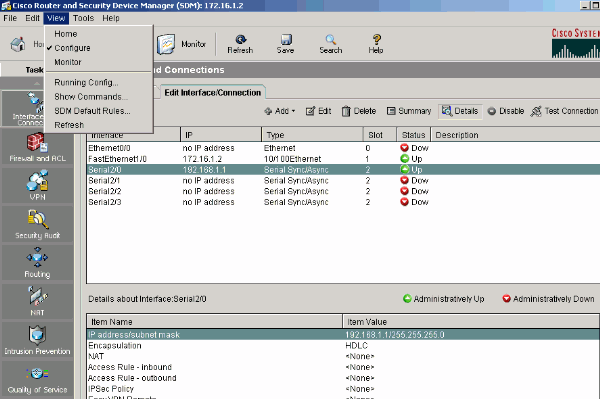
Secure Your Network with Cisco Security Device Manager (SDM)


Based on CISCO company, Cisco Router and Security Device Manager (SDM) is a Web-based device-management tool for Cisco routers that can improve the productivity of network managers, simplify router deployments, and help troubleshoot complex network and VPN connectivity issues. Cisco SDM supports a wide range of Cisco IOS Software releases and is available free of charge on Cisco router models from Cisco 830 Series to Cisco 7301. It ships preinstalled on all new Cisco 850 Series, Cisco 870 Series, Cisco 1800 Series, Cisco 2800 Series, and Cisco 3800 Series integrated services routers. Network and security administrators and channel partners can use Cisco SDM for faster and easier deployment of Cisco routers for integrated services such as dynamic routing, WAN access, WLAN, firewall, VPN, SSL VPN, IPS, and QoS. Cisco SDM offers smart wizards and advanced configuration support for LAN and WAN interfaces, Network Address Translation (NAT), stateful and application firewall policy, IPS, IPSec VPN, QoS, and NAC policy features. The firewall wizard allows a single-step deployment of high, medium, or low firewall policy settings. Cisco SDM also offers a one-click router lockdown and an innovative security auditing capability to check and recommend changes to router configuration based on ICSA Labs and Cisco TAC recommendations. Cisco SDM is a valuable productivity-enhancing tool for businesses and channel partners and allows them to implement router security and network configurations with reduced cost and increased confidence and ease. 

 Watch video below about: Security Device Manager (SDM) - Cisco CCNA Security Training This video on Cisco's Security Device Manager (SDM) is from our Cisco CCNA Security Series - Implementing Cisco IOS Network Security (IINS) for exam 640-553. The full series contains 20 videos and is over 11 hours of world class training you can watch anytime, anywhere. Our training comes in High Resolution AVI, iPod and mp3 formats to give you a number of choices in how to study and train. Our training also comes with MeasureUp exam prep software, to fully prepare for the exam and the real world. Visit us online at PalaestraTraining.com

Read more...

If you like this post, please subscribe below,thanks!

Enter your email address:

Delivered by FeedBurner

To Stay Up to date with Network Security, Please Subscribe!

Saturday, 5 September 2015

Network Security Fundamentals with APNIC

This blog is created for network security review, study and understanding about network related issues only! The blog is mainly focus on Network Security Notes about Network, Network Security, Network Technology, Network Labs review related Cisco and Microsoft technology ,Network Threats, Types of Network Threats, Network Alerts, Enterprise Security Policy and Audits, Security Policy and Audits,Logical Security, Physical and Logical Security, Physical Security,Cisco Products Review, Microsoft Products review, Cisco Routers, Routers Security, Console Access, Telnet Access, Network Attack, Network Attack report, Network management, Anti-virus, Network Security with Anti-virus, and All About Network Security... Thanks for your visit!

Network Security Fundamentals with APNIC


  Asia Pacific Network Information Centre (APNIC), is the not-for-profit regional Internet registry for the Asia Pacific region. APNIC provides number resource allocation and registration services that support the global operation of the Internet. It is a not-for-profit, membership-based organization whose members include Internet Service Providers, National Internet Registries, and similar organizations.

  APNIC's main functions are:
 -->allocating IPv4 and IPv6 address space, and Autonomous System Numbers,
 -->maintaining the public Whois Database for the Asia Pacific region,
 -->reverse DNS delegations,
 -->representing the interests of the Asia Pacific Internet community on the global stage. ==>Watch video: Network Security Fundamentals with APNI:

Read more...

If you like this post, please subscribe below,thanks!

Enter your email address:

Delivered by FeedBurner

To Stay Up to date with Network Security, Please Subscribe!

Tuesday, 1 September 2015

You Forget Your Wifi Password?

This blog is created for network security review, study and understanding about network related issues only! The blog is mainly focus on Network Security Notes about Network, Network Security, Network Technology, Network Labs review related Cisco and Microsoft technology ,Network Threats, Types of Network Threats, Network Alerts, Enterprise Security Policy and Audits, Security Policy and Audits,Logical Security, Physical and Logical Security, Physical Security,Cisco Products Review, Microsoft Products review, Cisco Routers, Routers Security, Console Access, Telnet Access, Network Attack, Network Attack report, Network management, Anti-virus, Network Security with Anti-virus, and All About Network Security... Thanks for your visit!

You Forget Your Wifi Password?


 You have Wifi Internet connection? Actually, you will put password for the Wifi. If you forget it, check out below: How To View Your Wifi Password (Security Key) On Computer

  How To View Your Wifi Password (Security Key) On Computer:

Read more...

If you like this post, please subscribe below,thanks!

Enter your email address:

Delivered by FeedBurner

To Stay Up to date with Network Security, Please Subscribe!

Wednesday, 26 August 2015

Are you upgrade to Windows 10 YET?

This blog is created for network security review, study and understanding about network related issues only! The blog is mainly focus on Network Security Notes about Network, Network Security, Network Technology, Network Labs review related Cisco and Microsoft technology ,Network Threats, Types of Network Threats, Network Alerts, Enterprise Security Policy and Audits, Security Policy and Audits,Logical Security, Physical and Logical Security, Physical Security,Cisco Products Review, Microsoft Products review, Cisco Routers, Routers Security, Console Access, Telnet Access, Network Attack, Network Attack report, Network management, Anti-virus, Network Security with Anti-virus, and All About Network Security... Thanks for your visit!

Are you upgrade to Windows 10 YET?


Microsoft Windows 10 as I know, is the latest version of Windows produced by Microsoft Company.

Are you still using Windows XP?
For me,the answer is YES! Some of my PCs are small with RAMs or Hardisk or its capacity is not available to upgrade to Windows 7,8 or event the Windows 10.

If your PCs or laptop is big enough or available to upgrade to the latest version of windows, let upgrade to see the latest technology of Microsoft Windows, one more thing, Windows 10 is the lasted features of security also having in this Windows functions.

Below are the tops 3 videos related to upgrading Windows 10,let find out...

Free Upgrade to Windows 10 | July 29 (Step by Step)


Windows 10: Should You Upgrade or Clean Install?
There are two ways to install Windows 10, an upgrade and a clean install. Here's why you should really do a clean install if you can.


Windows 10 auto upgrade from 8.1 full process took me 5 hours

Text from this video description:
I upgrade my Windows 8.1 to Windows 10 today 29th of July, the process is straight forward, just reserve your copy then it is automatically download and install. You just do some clicks and wait. However the downloading and installing processes take quite long. Mine is 5 hours plus. But it is worthy to do. Try yourself and good luck with your free copy of Windows 10.

This upgrade offer is for a full version of Windows 10, not a trial. 3GB download required; internet access fees may apply. To take advantage of this free offer, you must upgrade to Windows 10 within one year of availability. Once you upgrade, you have Windows 10 for free on that device.

Windows 10 Upgrade Offer is valid for qualified Windows 7 and Windows 8.1 devices, including devices you already own. Some hardware/software requirements apply and feature availability may vary by device and market. The availability of Windows 10 upgrade for Windows Phone 8.1 devices may vary by OEM, mobile operator or carrier. Devices must be connected to the internet and have Windows Update enabled. Windows 7 SP1 and Windows 8.1 Update required. Some editions are excluded: Windows 7 Enterprise, Windows 8/8.1 Enterprise, and Windows RT/RT 8.1. Active Software Assurance customers in volume licensing have the benefit to upgrade to Windows 10 enterprise offerings outside of this offer. To check for compatibility and other important installation information, visit your device manufacturer’s website and the Windows 10 Specifications page. Windows 10 is automatically updated. Additional requirements may apply over time for updates.

It’s easy to get your free upgrade – here’s how

Reserve
Use the Get Windows 10 app to reserve your free upgrade to Windows 10. We’ll download Windows 10 to your device and notify you when it’s ready. You can cancel your reservation at any time.
Click on the small Windows icon located at the right end of the taskbar to get started. If you don’t see it, visit our Q&A for more information.

Right bottom corner of the desktop with a circle around the Windows icon
Click “Reserve your free upgrade” in the app window.
Enter your email if you want confirmation of this reservation.
This free Windows 10 upgrade is available for PCs and tablets; the free Windows 10 Mobile upgrade will be available for most phones starting later this year.
Upgrade

On 29th July, once the upgrade is ready for your PC, we’ll send you a notification and you can upgrade right away or pick a time that’s good for you.
After you’ve upgraded, you have Windows 10 for free on that device.
Upgrade to Windows 10 with confidence. The Microsoft Answer Desk will be here for you with one-on-one support to get you up and running on Windows 10. For questions about upgrading to Windows 10, take a look at our Windows 10 Q&A or check to see if your question has already been answered in the community forum or post a new one.
----------------------------------------------------------------------------------------

OR: You Can visit website Microsoft directly about the upgrading to Windows 10 here: http://www.microsoft.com/en-us/windows/windows-10-upgrade

Read more...

If you like this post, please subscribe below,thanks!

Enter your email address:

Delivered by FeedBurner

To Stay Up to date with Network Security, Please Subscribe!

Protecting Investments with Cisco Application Centric Infrastructure

This blog is created for network security review, study and understanding about network related issues only! The blog is mainly focus on Network Security Notes about Network, Network Security, Network Technology, Network Labs review related Cisco and Microsoft technology ,Network Threats, Types of Network Threats, Network Alerts, Enterprise Security Policy and Audits, Security Policy and Audits,Logical Security, Physical and Logical Security, Physical Security,Cisco Products Review, Microsoft Products review, Cisco Routers, Routers Security, Console Access, Telnet Access, Network Attack, Network Attack report, Network management, Anti-virus, Network Security with Anti-virus, and All About Network Security... Thanks for your visit!

Protecting Investments with Cisco ACI


Cisco is the most leading equipment using in network system.

What is ACI?

ACI is Cisco Application Centric Infrastructure.

Investment is said about your business, so it very very important, you need to have an application centric infrastructure by Cisco to protect your business or your investment.

Let find out more with the video from Cisco below:

Read more...

If you like this post, please subscribe below,thanks!

Enter your email address:

Delivered by FeedBurner

To Stay Up to date with Network Security, Please Subscribe!

Thursday, 10 January 2013

Network Security Video Notes: Google knows more than even the government

This blog is created for network security review, study and understanding about network related issues only! The blog is mainly focus on Network Security Notes about Network, Network Security, Network Technology, Network Labs review related Cisco and Microsoft technology ,Network Threats, Types of Network Threats, Network Alerts, Enterprise Security Policy and Audits, Security Policy and Audits,Logical Security, Physical and Logical Security, Physical Security,Cisco Products Review, Microsoft Products review, Cisco Routers, Routers Security, Console Access, Telnet Access, Network Attack, Network Attack report, Network management, Anti-virus, Network Security with Anti-virus, and All About Network Security... Thanks for your visit!

Network Security Video Notes: Google knows more than even the government

Congress is continuing their plea for a comprehensive cybersecurity bill, and their latest attempt to govern the Web is attracting attention of not just the Internet savvy: a new amendment tacked on to a cybersecurity act includes a provision that deals with gun control. What is the meaning behind Washington's relentless attack on Internet freedoms, and does it even really matter? Private investigator Steven Rambam of Pallorium Inc. explains how Google already provides anyone with access to "private" information, and how a partnership with the US government could only expand the intel held by both entities to an alarming amount.


Google knows more than even the government

Watch Google knows more than even the government Video:


Watch The Future of Computer Security

Read more...

If you like this post, please subscribe below,thanks!

Enter your email address:

Delivered by FeedBurner

To Stay Up to date with Network Security, Please Subscribe!

Thursday, 13 December 2012

Network Security Video Notes: Secure Your Future

This blog is created for network security review, study and understanding about network related issues only! The blog is mainly focus on Network Security Notes about Network, Network Security, Network Technology, Network Labs review related Cisco and Microsoft technology ,Network Threats, Types of Network Threats, Network Alerts, Enterprise Security Policy and Audits, Security Policy and Audits,Logical Security, Physical and Logical Security, Physical Security,Cisco Products Review, Microsoft Products review, Cisco Routers, Routers Security, Console Access, Telnet Access, Network Attack, Network Attack report, Network management, Anti-virus, Network Security with Anti-virus, and All About Network Security... Thanks for your visit!

Network Security Video Notes: Secure Your Future

When your network goes down, you can lose a lot more than just your information. Having a way to effectively secure your network and your physical business location is crucial to ensuring a perpetually productive and successful business.

Secure Your Future


Watch Secure Your Future Video:


Watch The Future of Computer Security

Read more...

If you like this post, please subscribe below,thanks!

Enter your email address:

Delivered by FeedBurner

To Stay Up to date with Network Security, Please Subscribe!

Wednesday, 14 November 2012

Network Security Video Notes: Watch The Future of Computer Security

This blog is created for network security review, study and understanding about network related issues only! The blog is mainly focus on Network Security Notes about Network, Network Security, Network Technology, Network Labs review related Cisco and Microsoft technology ,Network Threats, Types of Network Threats, Network Alerts, Enterprise Security Policy and Audits, Security Policy and Audits,Logical Security, Physical and Logical Security, Physical Security,Cisco Products Review, Microsoft Products review, Cisco Routers, Routers Security, Console Access, Telnet Access, Network Attack, Network Attack report, Network management, Anti-virus, Network Security with Anti-virus, and All About Network Security... Thanks for your visit!

Network Security Video Notes: Watch The Future of Computer Security

Brad Templeton, chairman of the board of the Electronic Frontier Foundation (EFF), describes the future of online security, privacy and society. This lecture is from Singularity University's Graduate Summer Program 2009.

The Future of Computer Security


Watch The Future of Computer Security:


Watch The Future of Computer Security

Read more...

If you like this post, please subscribe below,thanks!

Enter your email address:

Delivered by FeedBurner

To Stay Up to date with Network Security, Please Subscribe!

Friday, 2 November 2012

Network Security Videos News: Internet Blocked In China During 18th Congress

This blog is created for network security review, study and understanding about network related issues only! The blog is mainly focus on Network Security Notes about Network, Network Security, Network Technology, Network Labs review related Cisco and Microsoft technology ,Network Threats, Types of Network Threats, Network Alerts, Enterprise Security Policy and Audits, Security Policy and Audits,Logical Security, Physical and Logical Security, Physical Security,Cisco Products Review, Microsoft Products review, Cisco Routers, Routers Security, Console Access, Telnet Access, Network Attack, Network Attack report, Network management, Anti-virus, Network Security with Anti-virus, and All About Network Security... Thanks for your visit!

Internet Blocked In China During 18th Congress

The CCP's 18th Congress is approaching, and the ramped up
security work has spread to the network.
The China's MIIT claimed, in order to ensure the telecom
network security during the 18th Congress,
a nation-wide network blockade will apply from November 7
to the end of the 18th Congress.
Some analysts pointed out that the
Chinese Communist Party (CCP) is testing people's reaction.
A network blockade is to ensure the smooth flow of the network
on the surface, but the essence is to strengthen the monitoring of the network.

According to the China IDC Circle website news, the network
blockade from MIIT has made certain requirements.
First, to implement a "person in charge" in all units and
all levels to ensure a smooth 24-hour contact among relevant persons
so that if anything should happen, they can
quickly report to their superiors.

In addition, it requires all provinces, autonomous regions,
and municipalities directly under the Central Government
to strengthen the supervision and management of the safe
operation of telecommunications networks in the area.
as well as safety production and interoperability.
Any violators who affect the operation of the network security
and interoperability will be severely punished.

In this regard, Hu Jun, "Rights Movement" network manager,
commented, to ensure smooth network traffic
is the surface reason, in reality, it is to strengthen monitoring
of the network.

"Rights Movement" network manager Hu Jun:
"Just for a few days of meetings, you block everything?
What are you afraid of?
Online communication is normal for citizens.
Who are your enemies and what are you so afraid of?
To protect the 18th Congress? Why do you need to protect it?
From your establishment to the present,
you always make sneaky moves.
If the Party were legitimate,
you should not be afraid of the public."

Hu Jun said that the 18th Congress is an assembly
for transferring power.
Only when you do something not righteous,
will you be afraid of letting people know.

Hu Jun: "The handover of power itself involves the issue
of dividing up interest.
This is a very clear problem, re-dividing the blood
and sweat of the Chinese people.
This process is not any different than the mafia's style.

No one knows yet so far what would happen to the wealth
from Xilai's corruption."

Columbia University visiting scholar Gu Chuan said that
the CCP Internet blockade is normal.
It strengthens the blockade during the 18th Congress.

Gu Chuan: "In the report, it states maintaining smooth
contact 24 hours a day, including with other websites.
They asked the websites to be ready for 24-hour emergency.

However, the CCP will certainly strengthen
network blockade during the 18th Congress.
Its purpose is to prevent people from knowing what people
overseas think of the 18th Congress."

Gu Chuan also added that there is no truth in China
and "truth" is monopolized by the CCP officials.
The messages of truth circulating on the network
will be quickly deleted.

Gu Chuan: "In addition to the truth about the persecution
of Falun Gong and the repression of democracy activists,
there is also the political struggles within the Party, princelings,
and factions, including the collusion between Zhou Yongkang and Bo Xilai.
The CCP does not want people to know any of these,
so during the two sessions it will strengthen the blockade."

Some analysts pointed out, the news of the "network blockade"
was not disclosed by "Xinhua News Agency" or "People's Daily."
It was by the semi-official "21st Century Financial Network."
It is estimated that the CCP wants to test the public reaction.
But in any case, as long as anything important occurs during
the 18th Congress, the CCP is bound to take some measures.
That means telephone, telecommunications, networks,
and other public dissemination tools will be cut off.

Watch Video: Internet Blocked In China During 18th Congress

Read more...

If you like this post, please subscribe below,thanks!

Enter your email address:

Delivered by FeedBurner

To Stay Up to date with Network Security, Please Subscribe!

Network Security News: Huawei and ZTE pose national security threat, US committee finds

This blog is created for network security review, study and understanding about network related issues only! The blog is mainly focus on Network Security Notes about Network, Network Security, Network Technology, Network Labs review related Cisco and Microsoft technology ,Network Threats, Types of Network Threats, Network Alerts, Enterprise Security Policy and Audits, Security Policy and Audits,Logical Security, Physical and Logical Security, Physical Security,Cisco Products Review, Microsoft Products review, Cisco Routers, Routers Security, Console Access, Telnet Access, Network Attack, Network Attack report, Network management, Anti-virus, Network Security with Anti-virus, and All About Network Security... Thanks for your visit!

Well as you may already know:

Huawei Technologies Co. Ltd. is a Chinese multinational networking and telecommunications equipment and services company headquartered in Shenzhen, Guangdong, China. It is the largest telecommunications equipment maker in the world, after having overtaken Ericsson.

Huawei was founded in 1988 by ex-military officer Ren Zhengfei and formed as a private company owned by its employees. Its core missions are building telecommunications networks; providing operational and consulting services and equipment to enterprises inside and outside of China; and manufacturing communications devices for the consumer market. Huawei has over 140,000 employees, around 46% of whom are engaged in research and development (R&D). It has 20 R&D institutes in countries including China, the United States, Germany, Sweden, India, Russia, and Turkey, and in 2011 invested around US$3.74 billion in R&D.

In 2010, Huawei recorded profit of 23.8 billion CNY (3.7 billion USD). Its products and services have been deployed in more than 140 countries and it currently serves 45 of the world's 50 largest telecoms operators.

Critics have pointed to the issues Huawei has with intellectual property rights, security concerns and treatment of its workforce and customers. Huawei representatives have in turn denied or disputed these allegations. Source: Wikipedia

ZTE Corporation (formerly Zhongxing Telecommunication Equipment Corporation) (SZSE: 000063; SEHK: 0763) is a Chinese multinational telecommunications equipment and systems company headquartered in Shenzhen, China. It is the world's fourth-largest mobile phone manufacturer measured by 2011 unit sales and the world's fifth-largest telecoms equipment maker measured by 2011 revenues (after Ericsson, Huawei, Alcatel-Lucent and Nokia Siemens Networks).

ZTE's core products are wireless, exchange, access, optical transmission and data telecommunications gear; mobile phones; and telecommunications software. It also offers products that provide value-added services, such as video on demand and streaming media. ZTE primarily sells products under its own name but it is also an OEM, manufacturing some products which retail under other brand names.

ZTE was founded in 1985 by a group of state-owned enterprises associated with China's Ministry of Aerospace. Source: Wikipedia

According to much concern or most concentration on security threat, we got a news related to the both Chinese companies mentioned above that found by US committee, that's Huawei and ZTE pose national security threat...

Huawei and ZTE pose national security threat, US committee finds

After a year-long investigation, a US congressional committee on Monday concluded that Chinese telecommunication equipment vendors Huawei Technologies and ZTE pose a security threat to the US, with lawmakers advising US private-sector firms to not buy networking gear from the companies....

Read more: Huawei and ZTE pose national security threat, US committee finds

Read more...

If you like this post, please subscribe below,thanks!

Enter your email address:

Delivered by FeedBurner

To Stay Up to date with Network Security, Please Subscribe!

Wednesday, 3 October 2012

Network Security News: Cyber Attacks from China on Crucial US Government Network

This blog is created for network security review, study and understanding about network related issues only! The blog is mainly focus on Network Security Notes about Network, Network Security, Network Technology, Network Labs review related Cisco and Microsoft technology ,Network Threats, Types of Network Threats, Network Alerts, Enterprise Security Policy and Audits, Security Policy and Audits,Logical Security, Physical and Logical Security, Physical Security,Cisco Products Review, Microsoft Products review, Cisco Routers, Routers Security, Console Access, Telnet Access, Network Attack, Network Attack report, Network management, Anti-virus, Network Security with Anti-virus, and All About Network Security... Thanks for your visit!

Cyber Attacks from China on Crucial US Government Network

A cyber attack on a secure US government network has confirmed fears that Chinese hackers are trying to gain access to classified defense information.

The attack came in September in the form of what's called spear phishing - an email with an attachment or bad link leading to a malicious website. The attack was linked to computer servers in China.

Fox News reported an unnamed source saying it was sent to someone in the White House Communications Agency. The employee opened the email against protocol but reportedly the attack was contained. The Communications Agency is responsible for internal White House communication as well as broader communication controlling nuclear commands. An unnamed White House official told the AP there was no indication that any information was obtained through the attack.

During his visit to Beijing this September, US Defense Secretary Leon Panetta raised concerns over the issue of cyber warfare. He called it the "potential battlefield of the future" and cited cyber attacks originating in China. He said he opened the discussion with Chinese leaders on international rules and standards for cyber warfare, but no concrete actions had been taken.

The cyber attacks have not been directly linked to the Chinese regime. However, published writings by the People's Liberation Army show that cyber attacks are a part of China's military strategy.

For more news and videos visit ☛ http://english.ntdtv.com
Follow us on Twitter ☛ http://twitter.com/NTDTelevision
Add us on Facebook ☛ http://on.fb.me/s5KV2C

Watch the video of Cyber Attacks from China on Crucial US Government Network from NTD below:

Cyber Attacks from China on Crucial US Government Network:

Read more...

If you like this post, please subscribe below,thanks!

Enter your email address:

Delivered by FeedBurner

To Stay Up to date with Network Security, Please Subscribe!